The ACR Dose Index Registry is a workflow, not a report
Most facilities that struggle with the ACR Dose Index Registry are not struggling with the registry. They are struggling because participation lives in one person’s head.
The pattern is familiar. Someone gets data flowing, works through the initial exam name mapping, pulls a report for a committee, and then moves on to the next project. Six months later the mapping queue has a backlog, a scanner has quietly stopped transmitting, and nobody remembers which filters produced last year’s report. When that person changes roles, participation effectively stops.
The DIR is worth far more than that, and getting more out of it is mostly a matter of treating it as a recurring process with named owners rather than a quarterly scramble. What follows walks through the four parts of that process and what a durable version of each looks like.
Getting data in, and knowing when it stops
Your scanners already produce a Radiation Dose Structured Report (RDSR) for every exam. The job is getting them to the ACR reliably through ACR Connect with DIR Link.
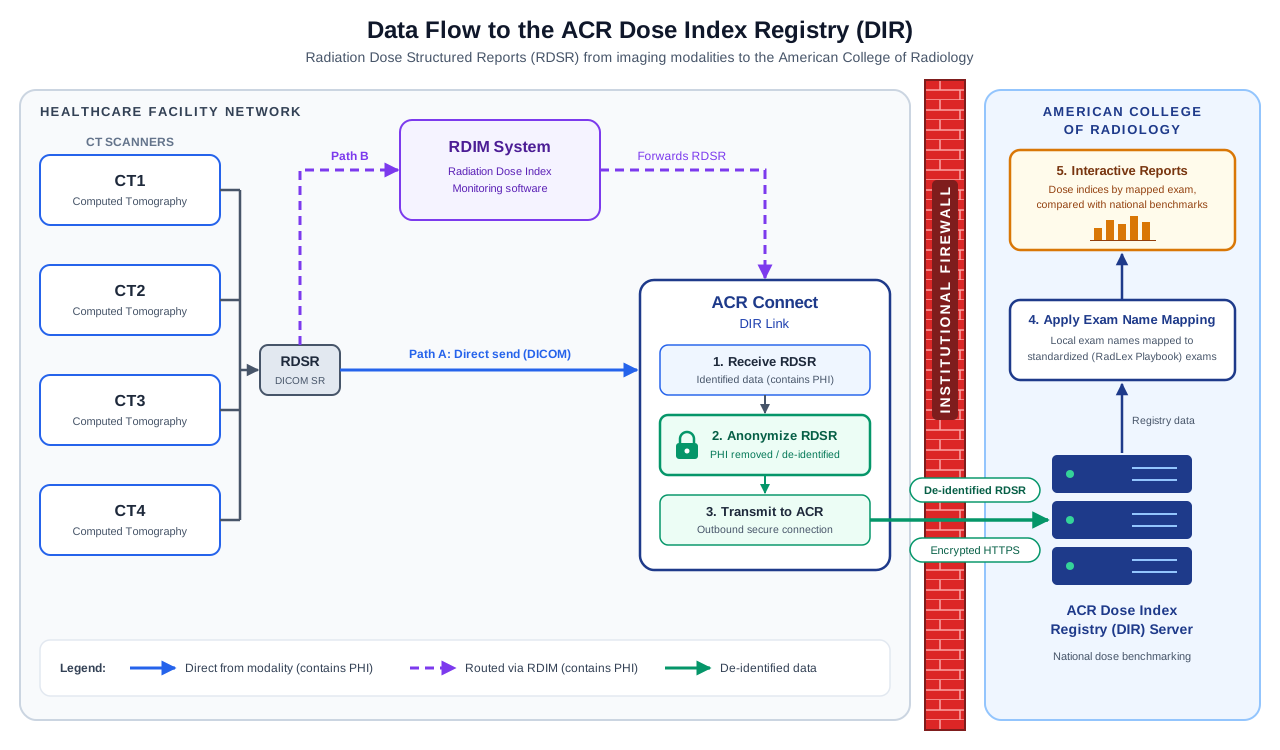
The ACR DIR Participation Guide and ACR DIR Knowledge Base are comprehensive guides to initial setup. Organizations assemble a team with the right group of stakeholders, and they get the DIR up and running.
The bigger challenge is ongoing maintenance. A scanner configuration is changed after a service visit, a network path changes, a certificate expires, your department changes their EAPs. Nothing alerts you. You find out a quarter later when a report shows a suspiciously low count of exams for a busy scanner.
The solution is unglamorous: someone must be responsible for checking DIR record counts against known exam volume, by scanner, on a set schedule. The ACR’s data quality checks give you a starting point, and the Summary of Data Submitted report shows counts by scanner and date added. A ten-minute monthly review catches in weeks what would otherwise cost you a quarter of data.
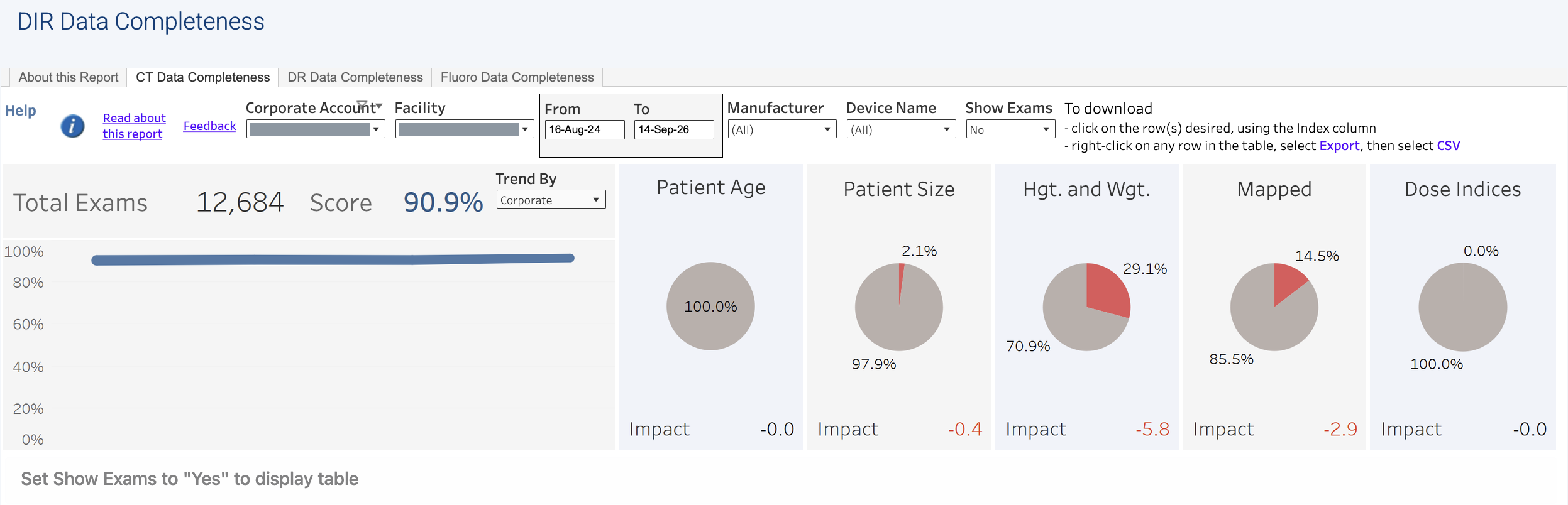
When we set this up, the check goes on a calendar with a named owner who has the necessary permissions in the DIR and access to true exam volume reports from the RIS team.
Exam name mapping determines whether comparisons mean anything
This is the step that most affects whether your data is useful. It is often treated as a one-time setup task, but it requires ongoing maintenance.
Radiology departments use unique clinical facility procedure names, which may be stored in the Study Description or Requested Procedure Description DICOM tags, depending on your RIS and scanner configuration. Exam name mapping connects your local clinical facility procedure names to a standard lexicon, which is what makes a benchmark a benchmark.
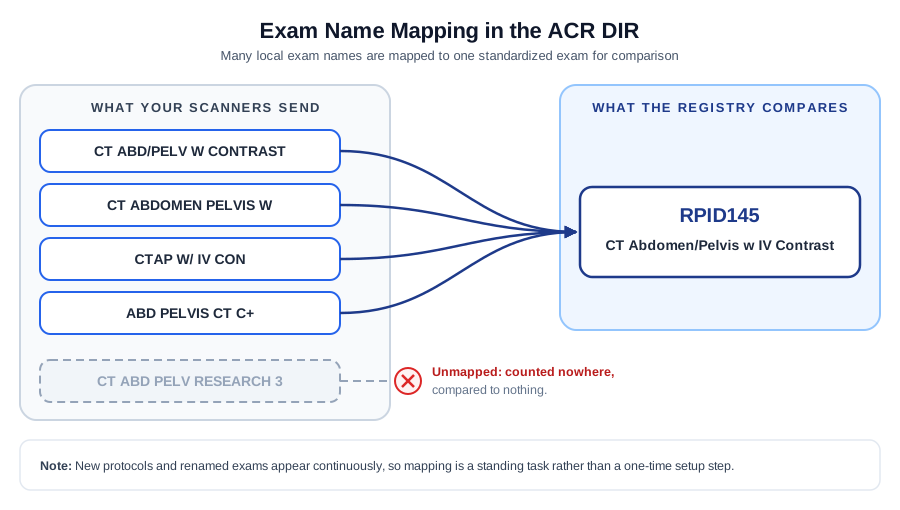
Unmapped exams are not compared to anything. They do not appear in your benchmarks, and they do not count toward measures extracted from the DIR. A site can look like a modest-volume facility with unremarkable doses while a meaningful fraction of its work is absent from the analysis because some clinical facility procedure names are unmapped.
New protocols appear, exams get renamed, scanners get replaced. Each of those creates incremental mapping work. The ACR provides excellent resources here, including the mapping resource guide, a walkthrough of how to use the mapping tool, functions for mapping multiple exams at once, and tips for ongoing maintenance.
We prefer offline mapping using the Excel download - especially once you have a base established. What the documentation cannot give you is consistency over time. Two people mapping a similar ambiguous exam a year apart will often make different choices, and the resulting trend line is then partly an artifact of who was doing the mapping. We write down the decisions and the reasoning, so the next person inherits a rule rather than a guess.
Analysis: build views once, reuse them forever
The DIR interactive reports are built in Tableau, and they reward a little structure. Each report has multiple dashboards, and you shape what you see with two kinds of control: filters, which restrict which data appears, and parameters, which change what is being measured or how it is aggregated. In the CT Standardized Dose Index Report, for example, parameters let you choose which dose index to chart and whether to aggregate by device, model, or manufacturer.
The feature that turns this from an afternoon of clicking into a repeatable process is the custom view. Set your filters and parameters the way you want them, then select view at the bottom of the dashboard. You can name the configuration and save it, and you will see the views you have saved previously.
This matters more than it sounds. A saved view named “Quarterly dose review, adult abdomen/pelvis, by scanner” is a written-down definition of what your department examines each quarter. Anyone with access opens it and sees exactly what their predecessor saw. Without saved views, every quarterly review starts with someone trying to remember which combination of filters produced a comparable chart last time, and your trend lines quietly stop being comparable.
The ACR’s guide to working with interactive reports covers the mechanics, along with highlighting, hover details, and the Keep Only and Exclude options for narrowing a busy chart.
Producing reports: screen captures and data downloads do different jobs
Once you are looking at the right view, you have two ways to get something out, and they serve genuinely different purposes.
Image, PDF, and PowerPoint capture the dashboard as it appears. These are what you want for a committee deck or a radiation safety report, because the chart arrives with its axes, legend, and context intact, and the audience sees what you saw. One limitation to know: these options capture only what is visible on screen, not content you would have to scroll to reach. Size the view before you export. Our suggestion? Use the PowerPoint option to quickly download the current view as a PowerPoint slide, then assemble them into your deck.
Data and Crosstab give you access to the data driving the charts and tables. You can reach the same endpoint with each, but the data can be organized a bit differently for each. If the Data option is greyed out, you first need to click on a chart or table. Then selecting Data from the lower right corner shows you the data driving the chart or table, which you can then download as a CSV and open in Excel. A Crosstab is a bit like a PivotTable in its structure, but it can be confusing to select the correct element from the list shown when you click Crosstab. You have the option to save a Crosstab as a CSV or native XLSX file.
The practical division: use PowerPoint for anything you are presenting, and use Data or Crosstab downloads for anything you are tracking yourself. A committee wants a picture with a caption. Your own quarter-over-quarter trending, your protocol optimization work, and anything you intend to combine with data the registry does not hold all need the underlying numbers. Sites that rely only on images find they cannot answer follow-up questions without going back to the portal, and sites that only download data find themselves rebuilding charts the registry already drew well.
The part that actually makes the difference
Everything above is documented by the ACR, and a capable person can work it out. The reason participation still degrades over time is that working it out is not the same as institutionalizing it.
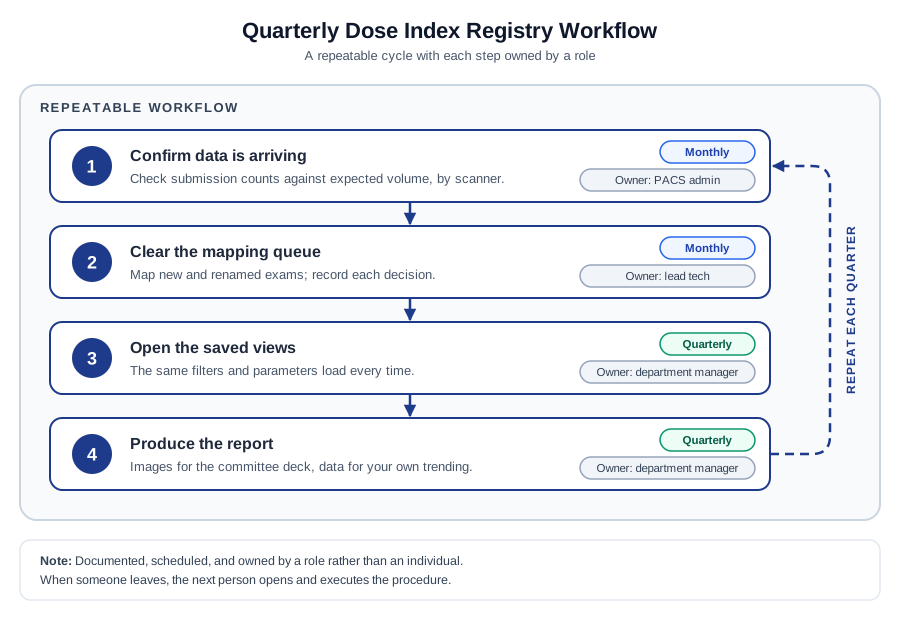
This is what KJMedPhys builds, and the deliverable is not a PDF - it is a process that produces the PDF. The output is a documented workflow: each step written out in plain English, assigned to a role rather than a person, on a cadence, with the saved views already built and named to match. Expected volumes are recorded so a gap is obvious. Mapping conventions are recorded so decisions stay consistent. The quarterly report has a defined shape, so producing it is execution rather than invention.
The test we aim for is simple. If the person who normally runs the quarterly analysis is unavailable, someone else should be able to open the document and produce the same report, at the same quality, without calling anyone. That is what makes registry participation survive staff turnover, and it is the difference between data you submit and data you use.
If your department is submitting to the DIR but not getting much back from it, or you are considering participation and want it built properly from the start, get in touch.